This is Part 5 of our 8-part series based on The Complete Guide to Solar Business Management Software (2026). This article goes deeper into Module 5: Subsidy & DISCOM Approval Tracking, starting with the practical workflow for tracking PM Surya Ghar and state subsidy applications.
A subsidy application rarely fails outright. It stalls.
A customer completes installation. The paperwork gets submitted to the portal. Someone on the team marks it "Applied" in a spreadsheet, and the file quietly waits. Weeks pass. Nobody flags it, because "pending" looks the same on day 2 as it does on day 52 - and nobody is specifically watching this file to notice the difference.
For a residential-heavy installer running dozens or hundreds of applications a month under PM Surya Ghar, this isn't a rare event. It's the default state of most subsidy files at any given time, and it stays invisible until a customer calls asking where their money is.
The Subsidy Lifecycle, Stage by Stage
Regardless of the state or DISCOM involved, most subsidy journeys under PM Surya Ghar move through a recognisable sequence:
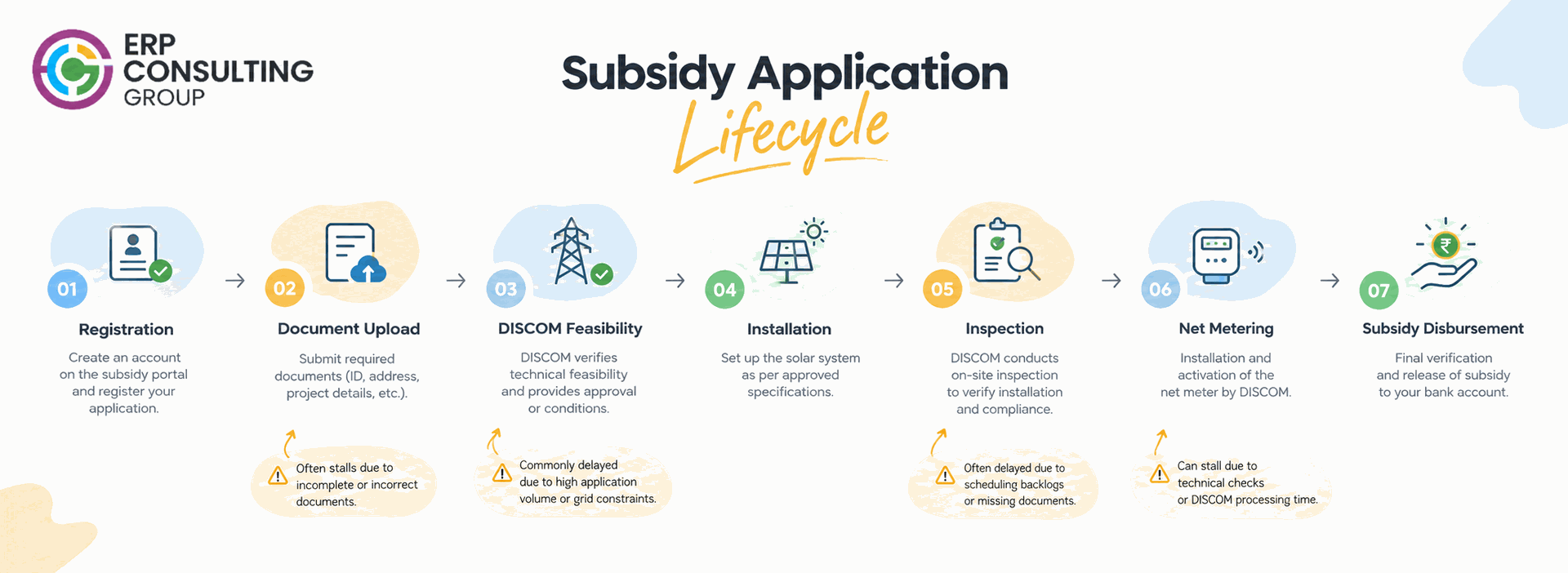
Registration → Document Upload → DISCOM Feasibility/Technical Review → Installation → Inspection → Net-Metering Confirmation → Subsidy Disbursement
Each stage has its own required documents, its own approving authority, and its own realistic turnaround. The installer directly controls only some of this - registration, documentation, and installation. The rest depends on DISCOM staffing, portal load, and how complete the paperwork was the first time it was submitted. Once the installation is complete, the DISCOM and net-metering approval stage becomes an important part of the process before the subsidy can be disbursed.
Where Applications Actually Get Stuck
- Incomplete documentation on first submission - the application gets kicked back, but the installer often doesn't find out until someone happens to check the portal.
- No single owner per file - the salesperson assumes the back-office team is tracking it; the back-office team assumes the customer will chase it.
- Time-based bottlenecks stay invisible - a spreadsheet marked "Applied" doesn't tell anyone this particular file has sat untouched for 45+ days.
- Disbursement and installation records live apart - finance can't easily match which subsidy corresponds to which completed, inspected installation.
Why This Becomes a Cash-Flow Problem, Not Just Paperwork
For most residential and small-C&I contracts, the subsidy amount is a meaningful part of what the customer is expected to pay. When it's delayed and nobody catches it early, three things tend to happen at once: the customer starts calling the company instead of the DISCOM, the sales team spends time firefighting instead of selling, and finance can't accurately forecast when subsidy-linked receivables will actually convert to cash.
None of this requires new software to fix immediately - it requires visibility into which files are stuck, how long, and who owns the next action. ERP Consulting Group builds exactly this kind of stage-by-stage, ageing-aware subsidy tracking into RENEWvate, our Odoo-based system for Solar EPC companies, so a file that's gone quiet gets flagged automatically instead of waiting for a customer complaint.
Treating the subsidy application as "done" once it's submitted, instead of monitoring it through to disbursement.
- Letting the salesperson remain the default owner of the file long after the sale has closed and their attention has moved to new customers.
- Submitting documents that technically meet the requirement but don't match the DISCOM's specific formatting or naming expectations, triggering avoidable rejections.
- Waiting for the customer to escalate before checking status, rather than proactively reviewing files on a fixed schedule.
- Not distinguishing between files that are genuinely progressing slowly through a legitimate DISCOM process and files that have actually stalled due to a missing document or an internal gap.
Why Documentation Errors Are the Single Biggest Delay Trigger
Of everything that stalls a subsidy file, an incomplete or mismatched document set on first submission causes the most avoidable delay. A KYC document that doesn't match the application name, a site photograph missing a required angle, a capacity figure on the invoice that doesn't match the DISCOM feasibility report - any of these can send a file back for correction, and the file then re-enters the queue from further back than where it started.
The frustrating part is that this is almost entirely preventable. A checklist enforced before submission - matching every required document against the specific DISCOM's requirements - catches most of these errors before they cost weeks. The businesses that struggle most with subsidy delays are rarely the ones facing genuinely slow DISCOMs. They're the ones re-submitting the same file two or three times because nobody checked it properly the first time.
Building a Connected Subsidy Tracking Workflow
The goal isn't to replace the DISCOM's process or add another layer of paperwork. It's to give the team a single, reliable place to see exactly where every file stands, without anyone having to remember to check the portal or call the customer. Below is what that looks like in practice, independent of which specific tool runs it.
Pre-Submission Document Verification
Before a file leaves the business, it can be checked against a state- and DISCOM-specific document checklist - registration proof, KYC, site photographs, capacity certificates, and any other locally required paperwork. Catching a mismatch here costs minutes. Catching it after DISCOM rejection costs weeks.
Stage-Linked Ageing Alerts
Instead of one generic "Pending" status, each file can carry a specific sub-stage with its own expected turnaround window. When a file sits in a sub-stage longer than that window - say, DISCOM technical review taking longer than the typical 15-20 working days for that state - it gets surfaced automatically rather than waiting for someone to notice.
Disbursement Reconciliation
Once approved, the subsidy disbursement should tie back to the specific project and installation record it belongs to. This is what allows finance to close the loop - confirming that a disbursed amount matches the expected subsidy value for that specific system size and scheme, without manually cross-referencing two separate trackers.
What a Connected View of Subsidy Status Looks Like
A working subsidy tracker - whether it's a well-maintained spreadsheet or a connected system - needs to answer four questions for every single file: Which stage is it at? How long has it been there? Who owns the next action? What's actually blocking it?
Subsidy Tracking | Manual / Spreadsheet-Based | Connected Workflow |
Stage visibility | Single "Pending" status field | Stage-by-stage sub-status: documents, DISCOM review, inspection, disbursement |
Ageing | No automatic flag for stuck files | Files idle past a threshold are surfaced automatically |
Ownership | Assumed, not assigned | Each file has a named owner and a defined next action |
Customer updates | Reactive - only when the customer calls | Status is available to reference proactively |
Documentation errors | Discovered after rejection | Checked against requirements before submission |
Finance linkage | Disbursement tracked separately from installation | Subsidy status tied to the project and installation record |
State-specific rules | One generic workflow for every state | Sub-stages adapted to each state/DISCOM's actual process |
Reporting | Manually compiled before a management review | Live view of applications by stage and age at any time |
Executive Summary
- Break "Pending" into real stages: registration, documents, DISCOM review, inspection, disbursement - each with its own expected turnaround.
- Flag files by age, not just status: a file stuck for 45+ days needs different handling than one stuck for five.
- Assign a named owner to every file, so follow-up doesn't depend on someone remembering.
- Keep the subsidy record connected to the installation record, so finance isn't reconciling two disconnected trackers later.
A subsidy delay is rarely about the scheme being slow. It's usually about a file nobody was actively watching.
Deep-Dive FAQ
Does this apply the same way across every state?
No. PM Surya Ghar is a national scheme, but DISCOM processes, documentation requirements, and typical turnaround times vary by state and sometimes by circle within a state. A subsidy tracker needs to accommodate state-specific sub-stages rather than force every application through one generic workflow - needs verification against your specific operating states, since DISCOM processes are revised periodically.
Can this be run without new software, just with discipline?
Yes, up to a point. A well-maintained shared tracker with an ageing column and a clearly assigned owner per row solves most of the visibility problem at low volume. It becomes harder to sustain manually once a team is running dozens of applications concurrently across multiple states - that's usually where a connected system starts saving real time rather than just looking tidier.
How does this connect to the sales and installation side of the business?
The subsidy application is triggered by, and eventually reconciles against, an actual installation. When the subsidy record is disconnected from the project record, finance ends up manually matching the two later. Keeping them linked from the start removes that reconciliation work entirely.
Who should own subsidy follow-up inside the company - sales, operations, or a dedicated back-office role?
There's no universally correct answer, but the file needs exactly one clear owner, whichever role it is. The businesses that struggle most are the ones where ownership is implicitly shared between sales and back-office - which in practice means neither actively drives the file forward. A dedicated back-office or subsidy-desk role tends to work better at higher volumes, since it removes the conflict with the salesperson's incentive to move on to the next customer.
What happens if a customer disputes the subsidy amount they eventually receive?
This is exactly where a clean record of the original application - capacity, scheme, documents submitted, and approval stage - becomes useful. Having the full trail available makes it far easier to explain a disbursed amount or identify a genuine error, instead of trying to reconstruct the history from memory or scattered files after the fact.
How many subsidy applications should one person realistically be expected to track manually?
There's no fixed number, since it depends heavily on how many states and DISCOMs are involved and how much variation exists between their processes. As a general pattern, though, once an individual is responsible for tracking more than a few dozen active files across multiple DISCOMs, manual tracking tends to degrade quietly - not through obvious neglect, but because ageing and prioritisation become genuinely hard to do reliably in a spreadsheet at that volume.
Is it worth separating "stuck due to DISCOM" from "stuck due to us" in reporting?
Yes, and this distinction matters more than it might seem. A file waiting on a DISCOM's own internal process tells management something different than a file waiting on the company's own missing document or unassigned follow-up. Reporting both the same way as generically "pending" hides exactly the part of the delay the business can actually control.
Ready to Connect Your Site Survey to Project Execution?
ERP Consulting Group's RENEWvate tool, built on Odoo, tracks each subsidy application stage-by-stage against the underlying project, flags files that have gone quiet, and keeps disbursement linked to the installation record for finance. We can review how your team currently tracks subsidy status and show what a stage-based, ageing-aware view would look like for your specific states and DISCOMs.
Start with your process, not a generic software demo - Book a Free Strategy Session or Email us at: info@erpconsulting24.com |
This article is part of our Complete Guide to Solar Business Management Software (2026)- read the full guide for the other modules, including DISCOM & net-metering approval tracking, and GST-compliant invoicing.

 Recent Posts




 Free Consultation